Introduction: Modernize Your Technology Without Putting Business at Risk
Legacy system modernization starts with understanding why established technology still matters to the business. Many enterprises depend on technology systems that were introduced years ago but still support essential business operations. These systems may process customer transactions, maintain financial records, manage inventory, support internal applications, or connect departments across the organization. Although they continue to deliver value, maintaining them can become increasingly difficult as business requirements evolve.
Outdated technology can limit integration, increase maintenance costs, create security concerns, and slow the introduction of new capabilities. Yet replacing a critical system is rarely as simple as installing a modern alternative. A poorly planned migration can interrupt services, affect customer experiences, disrupt employees, and put important business data at risk.
This creates a difficult decision for enterprise leaders: how can they modernize the technology infrastructure they depend on without compromising day-to-day operations?
The answer is not necessarily a complete replacement or a single large-scale transformation. A more sustainable approach combines careful assessment, phased implementation, data protection, testing, and continuous monitoring.
Successful legacy modernization is not just about upgrading technology. It is about creating a path toward future capabilities while keeping the business running reliably today.
On This Page
Why Legacy Systems Become a Business Challenge
Legacy systems are not necessarily ineffective simply because they are old. Many have supported complex business processes for years and contain valuable business logic that is not fully documented elsewhere.
The challenge emerges when these systems become difficult to maintain, integrate, secure, or adapt.
Rising Maintenance and Operational Costs
Older applications may depend on technologies that fewer professionals know how to support. Finding expertise, maintaining outdated infrastructure, and resolving compatibility issues can become increasingly expensive.
Teams may also spend a disproportionate amount of time fixing recurring problems instead of developing new features. These costs are not always visible in a single technology budget; they may appear across support, infrastructure, training, and operational teams.
Modernization gives organizations an opportunity to evaluate whether maintaining, improving, or replacing a system offers the best long-term value.
Limited Integration and Business Agility
Enterprises increasingly depend on connected applications, cloud platforms, analytics tools, customer systems, and automated workflows. Older systems may lack modern interfaces or require complex integrations to exchange information with newer applications.
As a result, even a small business change can require extensive development and testing. This can delay new services, create duplicate data, and make it difficult to respond quickly to changing customer expectations.
Security and Compliance Concerns
Legacy technology may rely on unsupported components, outdated authentication mechanisms, or configurations that are difficult to secure. The level of risk depends on the system, its environment, available controls, and whether the software still receives security updates.
Modernization can help address these concerns, but moving to a new platform does not automatically eliminate risk. Security must be considered throughout planning, migration, deployment, and ongoing operations.
Choosing a Legacy System Modernization Strategy
Not every legacy application needs to be rebuilt. Before committing to a particular approach, enterprises should understand the system’s business importance, technical condition, dependencies, and future role.
Common modernization strategies include:
Rehosting: Moving an application to a different infrastructure environment with limited changes. This can be useful when infrastructure needs to change quickly, although it may leave underlying application limitations unresolved.
Replatforming: Moving an application to a new platform while making selected changes to improve operations or compatibility.
Refactoring: Improving the application’s internal structure while preserving much of its existing functionality. This can make future maintenance easier without requiring a complete rewrite.
Rearchitecting: Changing the system’s architecture to support capabilities such as improved scalability, modular services, or more flexible integrations.
Replacing: Adopting a new application or platform when the existing system no longer meets business needs or is too costly to maintain.
Retiring or retaining: Decommissioning systems that no longer provide sufficient value, or keeping stable systems in place when the benefits of modernization do not justify the risk and cost.
The right choice depends on business priorities, technical constraints, available skills, budget, and acceptable disruption. A hybrid strategy is often more practical than applying the same approach to every application.
A Step-by-Step Approach to Low-Disruption Modernization
Step 1: Assess the Existing Technology Landscape
Begin by documenting the systems that support important business activities. This includes applications, databases, integrations, infrastructure, external services, security controls, and operational dependencies.
Identify which systems support revenue-generating activities, customer interactions, financial processes, regulatory obligations, or other critical functions. Determine which components are unsupported, expensive to maintain, difficult to integrate, or dependent on a small number of specialists.
Interviews with business users are equally important. Technical teams may understand how an application operates, but employees can explain where it creates delays, manual work, or operational bottlenecks.
The outcome should be a prioritized inventory of systems, risks, dependencies, and modernization opportunities—not simply a list of old technologies.
Step 2: Define Measurable Business Outcomes
Modernization should begin with a clear business objective.
An enterprise may want to reduce application downtime, shorten deployment cycles, improve transaction processing, strengthen security, reduce infrastructure costs, or enable faster integration with new services.
These goals should be measurable wherever possible. For example, instead of aiming vaguely to improve performance, the organization might define acceptable response times for critical transactions or establish a target for reducing recurring incidents.
Agree on baseline measurements before implementation. This makes it possible to evaluate whether the modernization project is delivering the intended results.
Step 3: Map Dependencies and Identify Risks
A system rarely operates in isolation. It may exchange data with payment platforms, reporting tools, customer databases, supplier applications, or third-party services.
Document these connections and identify which business processes could be affected if a component changes. Pay particular attention to batch jobs, data formats, authentication, scheduled processes, and undocumented integrations.
Conduct a risk assessment covering data loss, service interruption, security weaknesses, compatibility problems, and rollback limitations.
This stage should also identify systems that cannot tolerate downtime and determine whether maintenance windows, redundant environments, or alternative processing arrangements are necessary.
Step 4: Build a Phased Modernization Roadmap
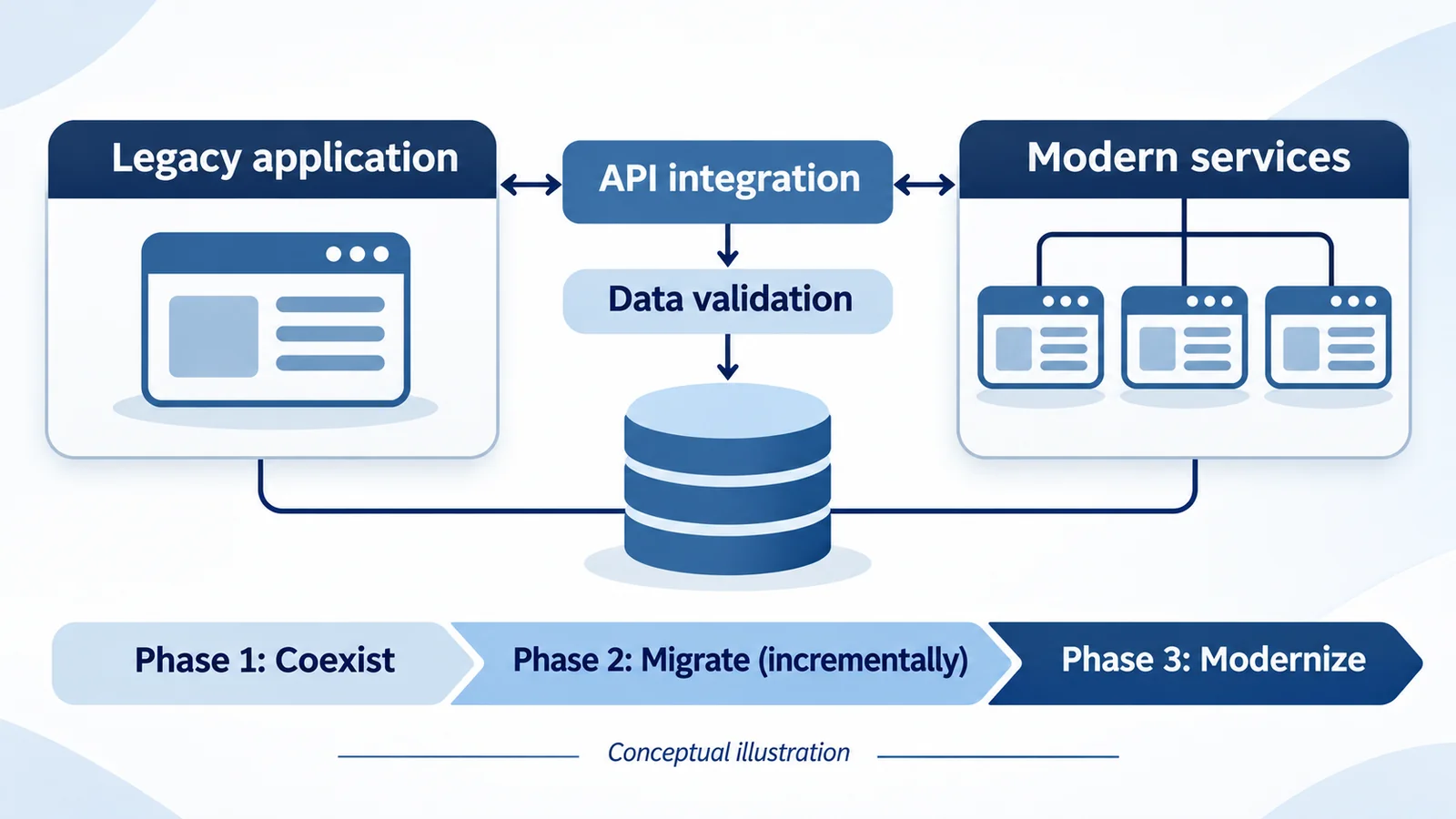
Instead of changing every critical application at once, divide the program into manageable stages.
Start with a system or component that provides meaningful business value while keeping the initial risk manageable. This may be a reporting service, a non-critical integration, or an application with a clearly defined boundary.
Use the results of early stages to refine estimates, test assumptions, improve deployment procedures, and prepare teams for more complex migrations.
A phased roadmap also gives business stakeholders better visibility into costs, dependencies, milestones, and expected benefits.
Step 5: Protect and Validate Business Data
Data migration is one of the most important parts of modernization. Moving information between databases or applications can introduce missing records, duplicate entries, formatting errors, inconsistent relationships, or changes in how values are interpreted.
Before migration, define the data that must be transferred, retained, archived, or securely disposed of. Establish appropriate access controls and encryption measures, and create backups that can be restored if necessary.
Where practical, test migration procedures using representative data before the production transition. Reconcile record counts, compare important business values, validate relationships, and investigate discrepancies.
For critical systems, consider staged synchronization or other methods that keep data consistent while the old and new environments operate in parallel. The appropriate method depends on transaction volume, architecture, and acceptable downtime.
Step 6: Test Real Business Scenarios
Technical tests alone are not enough. A modernized application may pass basic functionality checks while failing to support an important business process.
Testing should include functional behavior, integration compatibility, security, performance, recovery, and user acceptance. Use representative workloads and realistic scenarios to assess how the system behaves under normal and peak conditions.
Business users should verify that key workflows still produce the expected results. For example, a finance application should be tested for the calculations, approvals, reports, and reconciliations that employees rely on—not just whether the application launches successfully.
Resolve critical defects before moving forward, and document any known limitations and approved exceptions.
Step 7: Plan the Cutover and Rollback
The transition from the legacy environment to the modernized system is a critical milestone.
Create a cutover plan that identifies the sequence of activities, responsible teams, decision points, communication requirements, and validation checks. Establish explicit conditions for proceeding, pausing, or reversing the transition.
A rollback plan should be realistic and tested. Depending on the migration, returning to the previous environment may be difficult after new transactions have been processed or data structures have changed.
Teams must understand how data will be reconciled if rollback becomes necessary. For highly critical applications, a controlled parallel run may provide additional confidence before the old system is retired.
Step 8: Monitor Performance After Deployment
Modernization does not end when the new system goes live.
Monitor application availability, response times, transaction failures, infrastructure utilization, security events, and user-reported issues. Compare actual results with the baseline measurements established before the project.
Maintain clear escalation procedures and ensure that support teams understand the new architecture. A period of enhanced monitoring can help identify problems early while users adjust to changed workflows.
Only retire the old environment after confirming that required data has been retained, dependent systems are operating correctly, and the organization no longer needs the legacy application for recovery or reference.
Keeping Employees and Customers at the Center
Technology changes often affect the people who use the systems every day. Employees may need to learn new interfaces, adopt revised procedures, or understand different reporting methods.
Involve users early, explain the reasons for change, and provide practical training before deployment. Communicate any expected service interruptions in advance and give customers appropriate information when their interactions may be affected.
Assign clear ownership for questions, incidents, and feedback during the transition. User feedback can reveal issues that technical testing may not identify, particularly when the new system changes established working practices.
Common Modernization Mistakes to Avoid
Several decisions can increase the likelihood of disruption.
- Replacing technology without understanding the business processes it supports.
- Underestimating hidden dependencies and undocumented integrations.
- Migrating data without reconciliation and recovery planning.
- Attempting to modernize too many critical systems simultaneously.
- Treating security and testing as final-stage activities.
- Retiring the old environment before the replacement has demonstrated stability.
- Measuring success by project completion rather than business outcomes.
Avoiding these mistakes requires collaboration between technology leaders, business owners, security specialists, and operational teams throughout the program.
Conclusion
Legacy system modernization is a strategic business initiative, not simply a technology replacement exercise. Enterprises must improve flexibility, security, and maintainability while protecting the services, information, and workflows on which their operations depend.
A disciplined approach—starting with assessment, defining measurable goals, mapping dependencies, migrating data carefully, testing realistic scenarios, and planning a controlled transition—can reduce risk and make modernization more manageable.
The most successful programs do not pursue change for its own sake. They modernize with a clear understanding of business priorities, acceptable risk, and long-term value.
The objective is simple: build the technology the business needs for tomorrow without compromising the business that must operate today.